Toggle Nav


Toll Free No. : 1660-01-12787

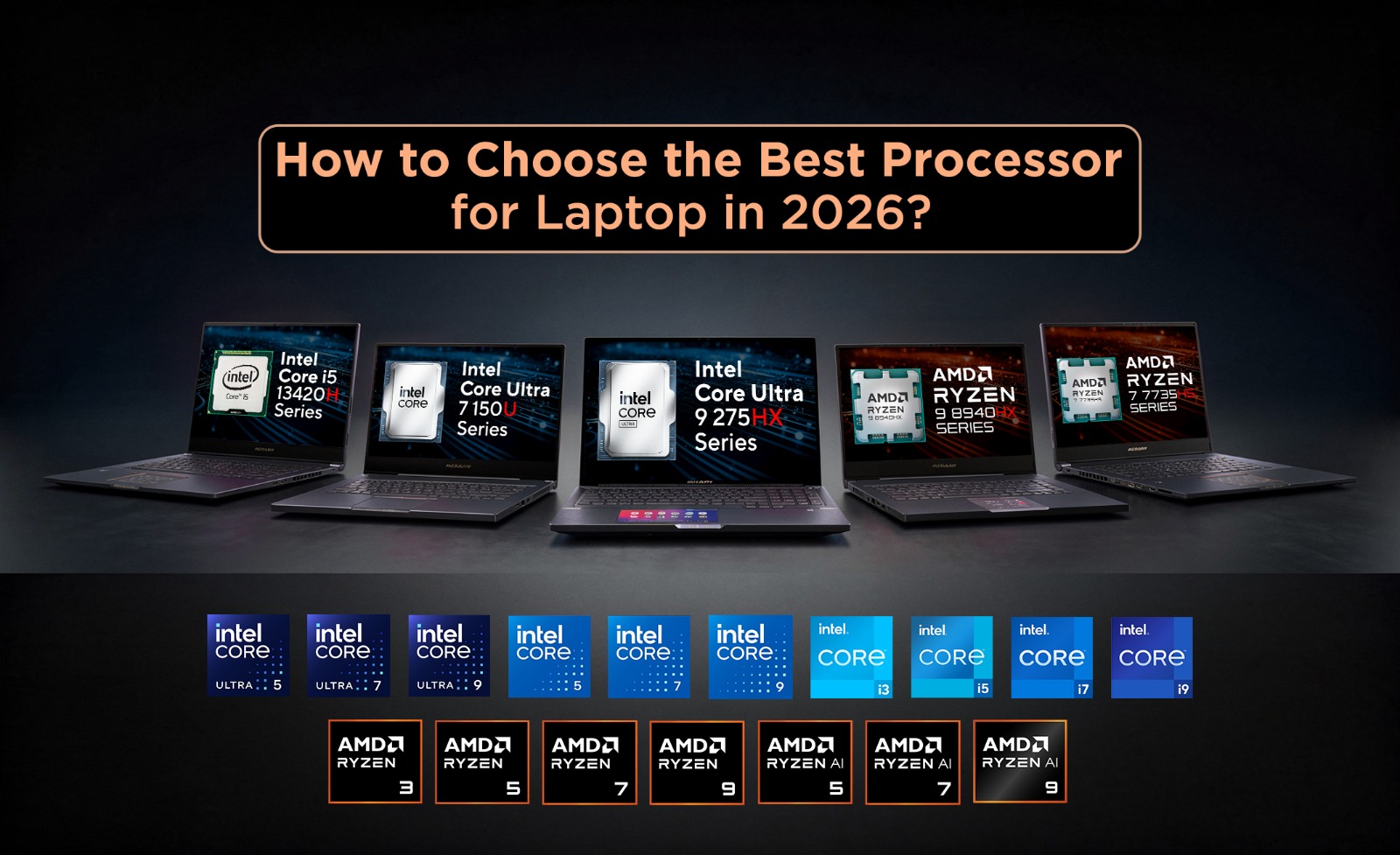
Among the main considerations when buying laptops is picking the correct processors. As AI laptops become common now, the processors have become an aspect that affects not only speed but also power efficiency, multitasking, games, content creation, on-device AI and much more. So, you have to pick the best processors for your laptops in 2026. In order to do this, you have to consider the number of cores and threads, analyze the capabilities of their integrated graphics, allocate realistic budgets for the processors and some other things.
In this blog, we give you tips on how to pick the best processor fore laptop in 2026, as well as some information about what laptop processors are, why you need to pick the best one and much more. But before we move on and discuss these topics in detail, let us start with the basics and learn what laptop processors are.
The Processor ( Central Processing Unit / CPU) is the core unit that controls the processing of all your data. All the information goes through the processor - ranging from surfing the Internet and using applications to making movies and complex math calculations. In 2026, processors will have built-in graphics, artificial intelligence cores and will be far more energy-efficient than now. All this makes your work more productive and helps to create more.
The processor is one of the key elements of your laptop. Battery life, performance and ability to run different applications rely on it. With the best processor, you will be sure that your laptop will cope well not only at the present moment but in the future. Here are some of the reasons why you should choose the best processor for your laptop:
With the help of the right processor, you can get improved performance on those tasks which are needed by you. You will be able to start different applications, browse web pages and watch video streams without any problems. Switching between different applications becomes easy.
When several applications are running concurrently, processor efficiency becomes a necessity. Contemporary CPUs, which feature multiple cores and Threads, easily manage demanding tasks such as video calling, document editing, development and media streaming without any significant delay. The outcome is improved computer performance.
Many contemporary laptops come with CPUs that are capable of delivering optimal performance while consuming minimal power. Modern CPUs effectively balance their power according to the demands of your tasks using innovative power management technologies. This allows extending battery life without compromising performance.
A properly selected processor will extend the lifespan of your laptop. A powerful CPU will be able to support the most recent operating systems and software. This means no need for upgrades within a couple of years.
By 2026, AI-enabled processors equipped with specific Neural Processor Units (NPUs) will become efficient in various applications. Processors enhance the capabilities of computers, such as voice assistants and real-time translations. In addition, NPUs minimize background noise, create pictures, and use intelligent productivity assistants. By choosing a processor that possesses modern capabilities, you will get all the advantages that contemporary software has.
On the surface, there are numerous technical details of laptop processors. To understand which CPU you need to purchase, it is essential to comprehend what each specification stands for.
It is a separate processor core that is able to perform its own tasks independently. The greater number of cores your computer possesses, the better.
Threads are virtual processors, which enable the cores to perform multiple jobs simultaneously. Multi-threaded CPUs have an advantage over non-multi-threaded CPUs in performing multiple operations or working with heavy software programs.
An 8-core CPU with 16 threads, for instance, will do multitasking much better than an 8-core processor with 8 threads.
Clock Speed is the frequency at which a processor executes instructions, and they are measured in gigahertz. This is divided into two parts:
The higher the clock rate - the faster the computer runs programs such as games, office applications and web browsers. The clock speed should not be considered independently of the number and architecture of processor cores.
This is a tiny block of memory that's very fast and located within the processor. It is used to store information which is accessed often so that the CPU can access the RAM quickly. Some key aspects of having high cache memory include:
Thermal Design Power (TDP) indicates the amount of heat a processor generates under typical workloads and helps determine its power consumption and cooling requirements.
A balanced processor has a TDP which lies between the higher- and lower-TDP processors. They provide good performance and consume low power.
A lot of new laptop CPUs have built-in graphics referred to as an Integrated Graphics Processing Unit (iGPU). The graphics processing unit allows eliminating the need for a dedicated graphics card for many people.
However, if you need to play high-end games or create something related to professional 3D rendering and video editing, then you will require a dedicated GPU.
One of the most impressive features that were implemented in laptops in 2026 is a chip that accelerates artificial intelligence tasks and consumes low energy – NPU.
An good NPU can improve:
You can also see TOPS (Trillions of Operations Per Second) listed in processor specifications. This measures the AI processing capability of an NPU. In general, a higher TOPS score indicates better performance of AI.
Selecting the most suitable processor does not mean that you will be getting the highest-performing processor; on the contrary, it also involves selecting a processor that suits your requirements and fits into your budget. Here are six things to keep in mind before buying your laptop in 2026.
Before you even think about processors, you first need to understand your requirements for the processor. To achieve this, you can begin with the usage purposes that you have in mind regarding the laptop. Daily users will benefit from mid-range processor models, whereas gaming, creation, programming, and professional use will require a CPU with increased performance. Processor selection based on requirements will be the most important factor in selecting the best processor.
The possible processor families available in 2026 will be Intel Core Ultra, AMD Ryzen AI, and Qualcomm Snapdragon X Series. The former offers balanced performance and AI capabilities, while the latter offers multitasking and integrated graphics; the Snapdragon X processors are designed to be energy efficient and to offer AI acceleration.
Core specifications include core count, clock speed, cache memory, and TDP. This set of characteristics determines how the processor copes with the load of tasks and apps. Instead of one single specification, it is important to consider all of them together.
Modern CPUs feature Neural Processing Units (NPUs), which help to run advanced AI features, such as Windows Copilot, real-time translation, and other AI-driven content creation tools. In case there is no dedicated graphics card planned, make sure to pick up a CPU that comes with great integrated graphics.
A powerful CPU is not the only thing needed for getting the best out of the system. It should be complemented by a sufficient amount of hardware to ensure that all the resources are properly utilized. Make sure to get at least 16 GB of RAM and an SSD.
Don’t base your decision solely on the brand name and how many generations have passed since its introduction. Look at the benchmarks and reviews to learn about its actual performance characteristics. And lastly, pick the processor that will be capable of handling all the future updates and improvements in software.
There are three key manufacturers dominating the laptop processor industry in 2026 for Windows, namely Intel, AMD, and Qualcomm. Each of these processors is available in a number of different models, depending on the needs of the individual user, from basic work to professional-level video editing and AI computation.
Intel has designed the Core Ultra processors in keeping with the age of AI. These processors boast remarkable CPU performance, in addition to being equipped with Intel Arc graphics and an NPU. The Intel Core Ultra processors are recommended for:
The AMD Ryzen AI processors have an emphasis on delivering outstanding performance with the cores, along with efficient power consumption, and the most efficient built-in graphics performance offered in a laptop processor. Along with having an AI engine, the Ryzen AI processors are perfect for performing heavy tasks like video editing, programming, and other applications, as well as improving battery efficiency. These processors will be best suited for:
The Snapdragon X series processors are a line of processors by Qualcomm for creating thin, light, and extremely efficient laptops. The Snapdragon X series processors are designed keeping in view the factors of extended battery life and AI performance. These processors are best for people who like working while on the move. Compatibility has improved greatly, but do check if all your applications run natively on Windows on ARM. Qualcomm Snapdragon x series processors best suited for are:
Finally, let's talk about how these processors differ from each other in terms of their features so that you can pick the right one out of these three processors. Both Intel Core Ultra, AMD Ryzen AI, and Qualcomm Snapdragon X series processors have their own strengths and excel in different departments.
| Features | Intel Core Ultra | AMD Ryzen AI | Qualcomm Snapdragon X Series |
| Performance | Excellent all-around performance with strong single-core and multi-core capabilities | Outstanding multi-core performance, ideal for demanding workloads | Excellent for everyday productivity, but trails Intel and AMD in heavy workloads |
| Battery Life | Very good power efficiency with long battery life | Excellent efficiency with competitive battery life | Best-in-class battery life, often lasting an entire workday or more |
| AI Features | Dedicated NPU with strong support for Windows AI features and Copilot+ experiences | Powerful Ryzen AI engine with high NPU performance for AI workloads | Industry-leading AI performance with an advanced NPU optimized for on-device AI |
| Gaming | Excellent when paired with a dedicated GPU; capable Intel Arc integrated graphics | Excellent gaming performance with powerful Radeon integrated graphics | Suitable for casual gaming, but limited support for many AAA Windows games |
| Content Creation | Great for photo editing, video editing, and creative software | Excellent for video editing, rendering, and multitasking thanks to high core counts | Best for light creative workloads and AI-assisted editing rather than intensive production |
| Software Compatibility | Excellent compatibility with virtually all Windows applications and peripherals | Excellent compatibility across Windows software and games | Good compatibility, but some legacy Windows applications may require emulation |
| Value For Money | Premium pricing with balanced performance and features | Excellent price-to-performance ratio across most price ranges | Great value for users who prioritize battery life, portability, and AI features |
Conclusion
Choosing the best processor for your laptop in 2026 is not only about picking the newest or the most expensive processor available. The ideal processor for your laptop should be suitable for the kind of work you do, your budget, and your future needs. Additionally, these processors should be able to give you the best performance and AI abilities. Luckily for you, the three major processors available for Windows i.e., Intel Core Ultra, AMD Ryzen AI, or Qualcomm Snapdragon X processor, each has its unique qualities.
In this blog, we provided you with insights on how to choose the best processor for your laptop. Alongside this, we also provided you with some insight into why choosing the ideal one for you matters, and the specifications of the processor. We hope you found this helpful. If you seek further insights into the various aspects of laptops such as the one we talked about here, do check out some of our other blogs. And if you want the best laptops with these processors, look no further than Nagmani International - one of the authorized distributors of Lenovo and Asus laptops in Nepal.
There are many good laptop processors out there, including Intel Core Ultra, AMD Ryzen AI, and Qualcomm Snapdragon X Series in the year 2026. But your needs can help you decide which to choose from the above because each is unique from the other.
Neither is better than the other, but you should go for Intel Core Ultra if you need a general-purpose processor and also wide software application compatibility. On the other hand, go for AMD Ryzen AI in case you need a processor capable of handling multitasking and content creation.
When it comes to laptop processors for home use, you will have to consider medium-range processors such as Intel Core Ultra 5, AMD Ryzen AI 5, and Qualcomm Snapdragon X.